![[Translate to English:]](/fileadmin/wu/_processed_/e/3/csm_042-Laptop-960_v1_2dc7c34c80.jpg)
Web Conferencing Tools
In all teaching rooms at WU, the web conferencing tools Microsoft Teams and Zoom are available. These tools enable you to record (lecture recording) or stream them live (lecture streaming) directly from the teaching room.
Lecture Recording
Before the Class
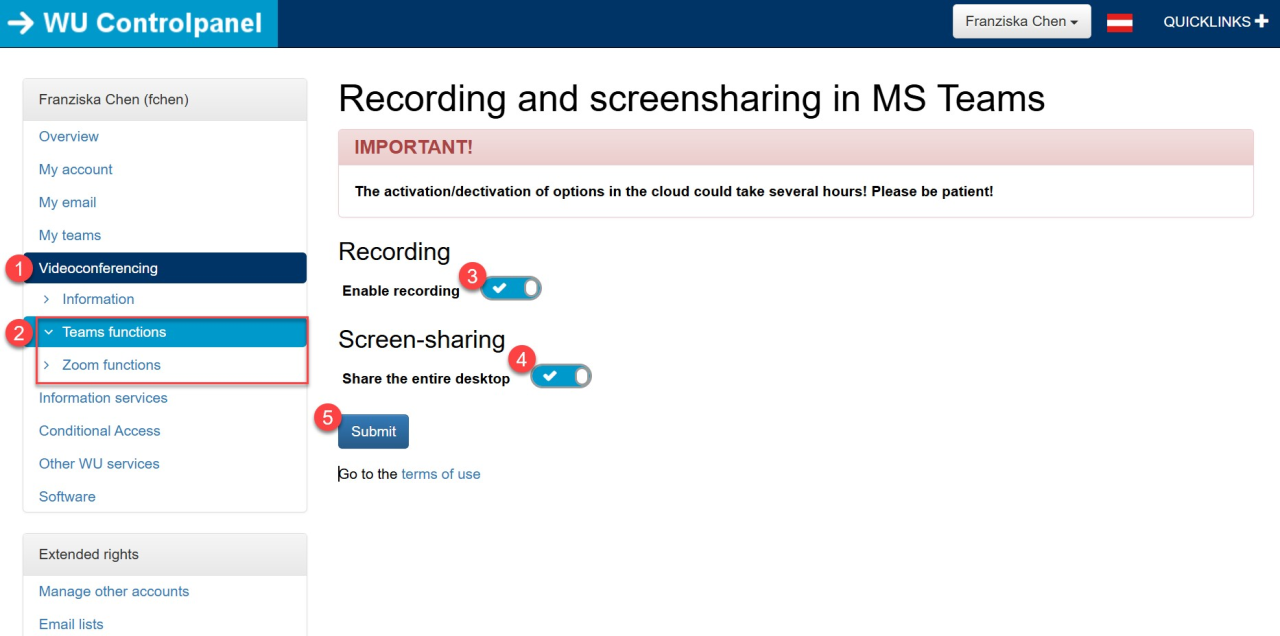
On the Day of the Class
After the Class
Lecture Streaming
It is recommended to conduct lecture streaming via Microsoft Teams as it supports a larger number of online participants than Zoom.
Before the Class
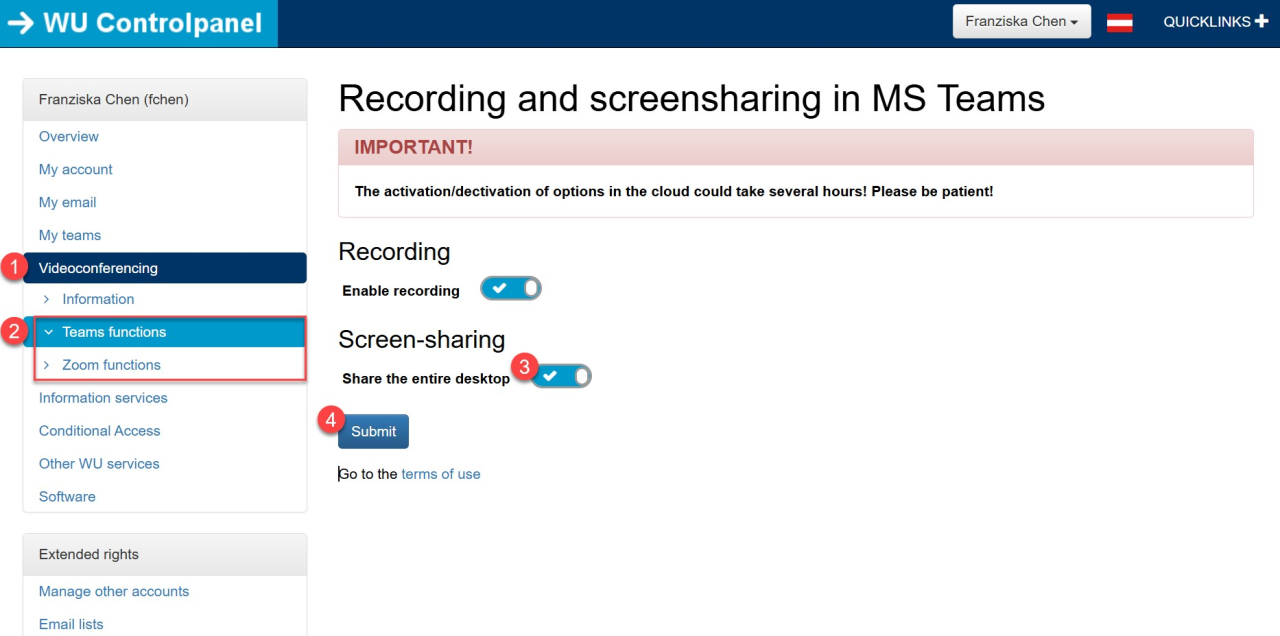
On the Day of the Class
Up to 10,000 Online Participants
Microsoft Teams allows lecture streaming with up to 10,000 online participants.
Important for events with more than 1,000 participants: From 1,000 participants onwards, additional attendees can only join in view-only mode - they can watch and listen but cannot chat, react, or share content.
If you expect more than 1,000 participants, use the Microsoft Teams Live Event (VPN required).
Legal Guidelines
The following information is intended for instructors who wish to record or stream their lectures at WU Vienna as part of their teaching activities. From a legal perspective, rights related to lectures, performances, reproductions, broadcasting rights as well as certain personal rights must be observed.
Students' participation by speaking up or asking questions should not be restricted by lecture recording or lecture streaming. To ensure smooth operation while respecting personal rights of those present, care should be taken when positioning cameras and conducting audio recording so that identifiable voices or faces of third parties are avoided as much as possible (see below). These aspects have already been considered when positioning cameras which cannot be changed anymore.
An exception is hybrid teaching using MS Teams/Zoom in teaching rooms where part of students attend physically while others participate online via web conferencing tools.
Selected rooms have been equipped with tracking cameras and ceiling microphones for this format (see overview table). Tracking cameras allow transmission of larger areas of teaching rooms to capture students during discussions for online participants; ceiling microphones ensure that student contributions can be heard by online participants via MS Teams/Zoom. Displaying students visually and audibly is explicitly desired in this scenario and does not require separate consent as long as no recording (saving of streams) occurs.
The following is a brief summary of what to consider when recording or streaming lectures regarding students:
Image and Voice of Students in Lectures
Recording and distributing identifiable images or voices constitutes processing personal data requiring consent. Recording only backs of heads or indistinguishable interjections usually does not require consent.
Students should be informed about recording/streaming:
In advance when announcing lectures
At lecture start
Information should include whether only streaming or also recording takes place, what content is recorded, how it will be published, and that technical errors cannot be excluded. Students should understand that it is not them personally but their lecturer who is being recorded.
Often student remarks are not clearly attributable because they do not speak into microphones; instructors can repeat such questions anonymously during lectures without naming individuals. If contributions are clearly attributable without explicit consent they should be edited out. For recorded/streamed lectures it is recommended to structure sessions into a lecture part and separate Q&A part which may not be recorded.
If third-party recordings cannot be excluded consent must be obtained either during registration or at lecture start; if consent is denied or withdrawn respective parts must be removed from recordings.
Sample Consent Text
[Text should be adapted according to circumstances]
“I [FIRST NAME, LAST NAME], born on [dd.mm.yyyy], consent that video recordings including image and sound specifically featuring me may be used for university teaching purposes and published or made available accordingly.
I derive no rights (e.g., remuneration) from this consent.
This consent may be revoked at any time with future effect by notifying those responsible for video recordings; upon revocation recordings will be removed from relevant platforms; if recordings were publicly accessible online they will be removed according to possibilities of responsible parties.”
Recordings by Students
Unauthorized filming, photographing presentations or audio recording of lectures created by instructors infringe copyright and personal rights especially when uploaded later on social media platforms like Facebook. It is recommended to inform students about this at lecture start.