
Booking
Would you like to record a video, produce a podcast, or explore innovative tools such as virtual reality applications with your students? Then you can book the FLEX Media Studios or the FLEX Lab. Students can also book the FLEX Media Studios themselves as part of their courses (e.g., for media assignments).
Bookings for the FLEX rooms are made electronically via the “Rooms” booking tool. The booking process for employees and students is described below.
How does the booking process work for employees?
Employees can book the FLEX Media Studios and the FLEX Lab via Rooms. Bookings for the FLEX Lab are subject to an approval process and must be made at least one day before the room is to be used.
The rooms can be booked via Rooms using the following link:
Please note the following when booking FLEX rooms:
Please note the opening hours. Filming at FLEX Media Studios is only permitted during the reserved time slot
When using the FLEX Media Studios, please note the following in particular:
You can pick up your access card for the FLEX rooms at the IT Service Desk in the TC Building if you have booked the room or are listed as the media owner in the booking.
Please do not leave any valuables unattended in the FLEX Center, and please leave the rooms in a tidy condition
Media created in the FLEX Media Studios is automatically uploaded to Planet eStream and assigned to the person who booked the room or to the media owner
If you notice a technical issue in the FLEX Media Studios, please contact IT Services at the following number: +43 1 313 36 3003 or submit a ticket
How do I create a booking in Rooms?
The following section describes the booking form in Rooms.
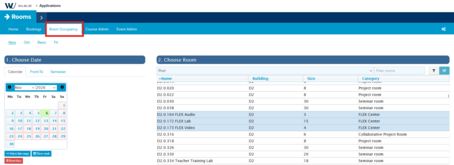
Under the “Room Occupancy” menu item, you can view an overview of available times for the FLEX rooms:
How can FLEX Media Studios be booked on behalf of someone else?
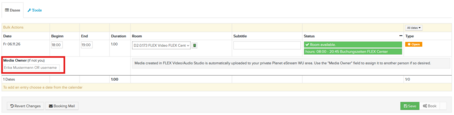
Rooms at the FLEX Center can also be booked on behalf of colleagues or students. To do so, use the “Media Owner” field in the room booking tool when booking FLEX rooms:
If a person is listed in this field, they are authorized to pick up the access card for the Center’s rooms during the reserved time
The produced video and audio files will be assigned to them in their private Planet eStream area
When using the “Media Owner” field, please note the following in particular:
When making a booking on behalf of other WU employees, enter the first and last name or the username of the person in question in the “Media Owner” field
When making a room reservation on behalf of students, enter the student ID number (h+student ID number, for example: h12345678)
Please note that only one name can be entered. It is not possible to assign the reservation or media to multiple people
How does the booking process work for students?
Students can use the FLEX Media Studios as part of their courses. To log in to Rooms, use your username (h+student ID number, for example, h12345678) and password.
Students should keep the following points in mind when booking the FLEX Media Studios:
FLEX Media Studios may only be booked by regular WU students (NOT by co-enrollees or non-degree students)
Bookings can be made up to 14 days in advance
The maximum booking duration is 2 hours
Students should take particular note of the following when using the FLEX Media Studios:
You can pick up your access card at the IT Service Desk in the TC. You’ll need your student ID to pick it up. The access card is issued exclusively to the person who booked the room
Please make sure to record only during the reserved time slot. Recordings made outside the reserved time slot cannot be assigned
Please do not leave any personal belongings or valuables unattended in the FLEX Center, and please leave the rooms in a tidy condition
Media created in the FLEX Media Studios is automatically uploaded to Planet eStream and assigned to the person who booked the room or to the Media Owner
If you notice a technical issue in the FLEX Media Studios, contact IT Services at the following number: +43 1 313 36 3003 or submit a ticket
How do I create bookings in Rooms?
The following section describes the booking form in Rooms:
Calendar
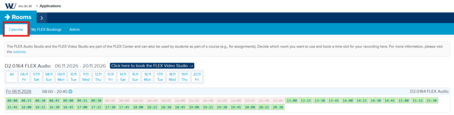
In the calendar, you must first specify whether you want to book the FLEX Audio Studio or the Video Studio. The FLEX Audio Studio is selected by default. You can change the selection by clicking the button above the calendar overview. Then select one of the available time slots shown in green in the calendar to proceed with booking the rooms.
Create booking
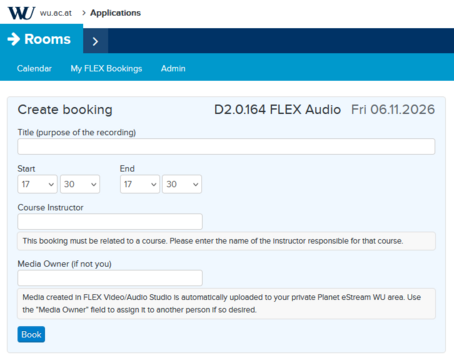
Since FLEX Studios can only be reserved as part of a course, the course instructor must be entered in the “Course Instructor” field when making the reservation.
The Media Owner field provides an optional way to make the reservation on behalf of another person (e.g., fellow students). If someone is entered here, the media created will be assigned exclusively to the Planet eStream account of the person specified here. The access card can be picked up by the person who made the booking or by the Media Owner. This can be a fellow student (h+student ID number, for example h12345678) or the name of a instructor.
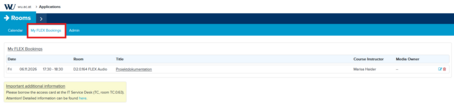
My FLEX Bookings
Once you have completed the booking, you will find your reservation under “My FLEX Bookings.”
Where can I get the access card for the FLEX Center?
To enter the FLEX Center, you need an access card. You can pick it up on the day of your reservation at the IT Service Desk in the TC Building (Room TC.0.63 - map). You’ll need to show a form of ID to pick it up. The card is issued exclusively to individuals who have booked the room or are registered as media owners, and must be returned to the IT Service Desk on the same day. If recording takes place over multiple days, the card must still be returned after each use of the room.
Important Note: Those who make reservations are responsible for the FLEX rooms during the reservation period, in accordance with the terms and conditions for reserving and using the rooms of the FLEX Center. They are therefore also liable for any consequences resulting from misconduct.
Terms and Conditions for Reserving and Using the Rooms of the FLEX Center
The rooms at the FLEX Center may be used exclusively for university purposes. Any form of commercial use is prohibited.
The rooms at the FLEX Center are intended specifically for teaching and research activities, student group work (such as media assignments), and holding small-scale courses.
The rooms at the FLEX Center may only be used by the person who made the reservation or the registered media owner for the reserved time period after a successful booking via the “Rooms” online tool. Even if a room initially appears to be unoccupied, a reservation must first be made before the room may be used. No room may be used without a prior reservation, even if it appears to be unoccupied.
The specified maximum number of people per room must not be exceeded. The maximum number of people is displayed when booking the room: FLEX Lab (15 people), FLEX Video Studio (4 people), FLEX Audio Studio (3 people).
Bookings for students can be made no earlier than 14 days before the respective date of use. The booking must be made by a student from the group. A room may be booked for a maximum of 2 hours per booking.
Once the booked time slot has expired (or after the booking has been canceled via the “Rooms” online tool), the booking is void.
Bookings can be canceled up until the start of the booking period.
Bookings and booking credits cannot be transferred to other people. The person making the reservation or the media owner must be present during the reservation period; otherwise, they must cancel the reservation.
The rooms at the FLEX Center cannot be locked individually, even if reserved. The person making the reservation is liable for the room’s furnishings as well as for any lost or stolen items during the reservation period.
Reservations are displayed on the room’s door display. Even if the person who made the reservation arrives late, the reservation remains valid. It is not permitted to reserve rooms at the FLEX Center “in advance.”
WU reserves the right to periodically review usage. If it becomes apparent that a room has been reserved but not used (“no-show”), the person who made the reservation may have their booking privileges restricted or revoked.
Bringing food into the FLEX Center rooms is not permitted.
At the end of the booking period, the FLEX Center rooms must be vacated and locked without being asked, leaving them in a tidy condition (trash removed, lightboard cleaned, VR headsets returned or locked away, etc.). If a room is not left clean and tidy after the booking period ends, the user’s booking privileges may be revoked.
WU assumes no liability for the proper functioning of the IT equipment. Likewise, the University excludes any liability for potential malfunctions of the hardware and software used, or for the loss or damage of data or data storage media brought onto the premises.
Future Learning Experience
